Enhanced Email Security
Keeping your emails cyber safe at Western
At Western, your cyber safety and security matters to us. Protecting your emails is one of the most important ways to keep your data cyber safe. That is why we are enhancing your email security with a new functionality.
Our new email functionality will help you receive ongoing protection from cyber-attacks and suspicious senders, across all devices, without you having to install any software.
No action from you is required – this will all happen behind the scenes. It is email security made simple.
What is this new functionality?
Western’s new enhanced email security tool is a form of email ‘quarantine’: an automatic filtration system for potentially suspicious senders. You can review and release the quarantined/held emails for up to 30 days, from the time of quarantine.
Key benefits include:
- Extra protection against suspicious senders and website links. You will be alerted when a sender or website link may pose a threat.
- Seamless delivery. Suspicious emails will be automatically filtered out and ‘held’, with no software download required.
- Self-management capabilities. You will have the option to block all future messages from suspicious senders, and permit emails that may have accidentally ended up in quarantine.
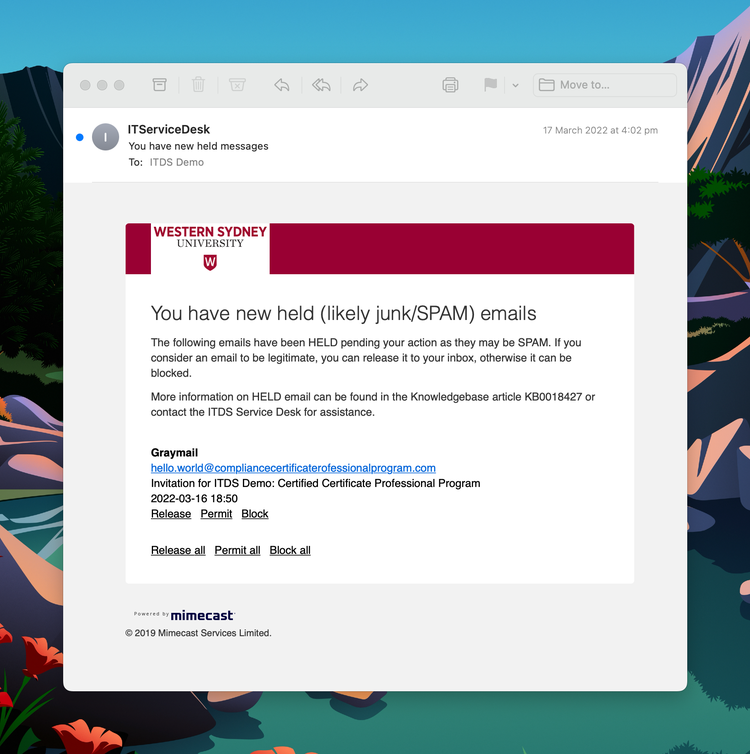
See an example in this short video:
An example of the email quarantine digest feature. Click to view full size.
Why do I need it?
It is important for all students and staff to have robust mechanisms in place to protect confidential and sensitive information. Our emails include private exchanges and University business materials, and are therefore considered data that should be protected. In addition, a potential threat to one individual’s email account places the University at risk of a larger cyber-attack.
We all have a responsibility to be cyber aware
Please keep in mind that no tool can guarantee 100% cyber safety and security. We all have a responsibility to be cyber aware. Ensure you know how to recognise suspicious emails and links, and always follow best practice guidelines on cyber safety and security at Western.
How can I learn more?
This page answers some frequently asked questions about the new functionality and enhanced email security measures in our email tool.
For more information, please see:
- Knowledge base article KB0018604 (opens in a new window): the '[External]' email tag;
- Knowledge base article KB0018605 (opens in a new window): email URL protection;
- Knowledge base article KB0018427 (opens in a new window): held email digest;
- Knowledge base article KB0017535 (opens in a new window): what 'DMARC' is and why it may appear on a quarantined email digest;
- Knowledge base article KB0013529 (opens in a new window): how to report spam and phishing emails to the ITDS Service Desk; and
- Knowledge base article KB0011503 (opens in a new window): general information on email security.
FAQs
General queries (for staff and students)
The '[External]' tag (for staff)
The tool can automatically determine whether an email originated internally, but there are instances where a Western system is hosted by an external party outside our network, such as cloud-based services, which may be categorised as 'External'. An example of this includes email digests from Yammer, which is an externally hosted platform.
If you receive an email from an internal system that you believe has been tagged as ‘External’ in error, please contact ITDS via WesternNow with details so it can be reviewed.
This message gets added to all emails with the 'External' tag. It is intended as a reminder that unusual or unexpected hyperlinks and attachments in emails are cause for suspicion, and should not be clicked on unless you recognise the sender and know they are safe. Please contact ITDS via WesternNow if you are unsure.
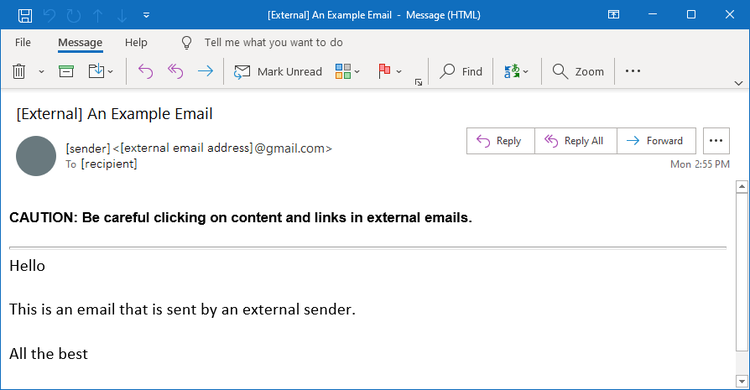
An example of the 'Caution' message. Click to view full size.
Emails between students and staff is considered internal and so they should not be marked as external. However, if a student emails from a personal email address, this is the same as any other external email addresses and it will be marked 'External'.
Also, any emails containing links from students sent to staff will have their links redirected (re-written).
The Email Quarantine feature (for staff)
Hyperlink redirects in emails (for staff and students)
Yes, when you hover over the link, the link will appear like this example below, where domain=xxx portion indicates the original link domain. You should continue to check links before clicking on them as before, but only need to check the domain (at the end) is as expected and can ignore the rest (eg. in the example below, you would be visiting “abc.net.au”).
e.g. https://protect-au.mimecast.com/s/dizbc1wlan?domain=abc.net.au
Double-check the link is correct (going to where you expected it to) and think about if it is really somewhere you need to visit.
If it is, you can click the 'Accept Risk and Continue' link; however it will be logged that you over-rode the warning. You should then also be extra careful about any information you enter at the site and clicking on any links or downloading any files.
If unsure (or if you feel the site is safe and the warning is incorrect) please contact ITDS via WesternNow and seek advice.
Cyber Security
Resources
- Security guidelines for travelling overseas (PDF, 105.26 KB) (opens in a new window)
- Phishing Scams Awareness poster (PDF, 1455.13 KB)(opens in a new window)
- Phishing Scams Awareness postcard (PDF, 658.25 KB) (opens in a new window)
- Password Security postcard (PDF, 151.34 KB) (opens in a new window)